
Chrome Extension
YouTube Tools
Download YouTube thumbnails in just 2 clicks.
The easiest way to get high-quality video previews.

Why YT Tools?
One-Click Downloads
Download YouTube thumbnails instantly without leaving the video page
All Quality Options
Access all available thumbnail sizes from SD to Full HD
Works Everywhere
Compatible with regular videos, Shorts, and live streams
Step 1
Install the Extension
Add YT Tools to your Chrome browser from the Chrome Web Store. It is free and takes just seconds.

Step 2
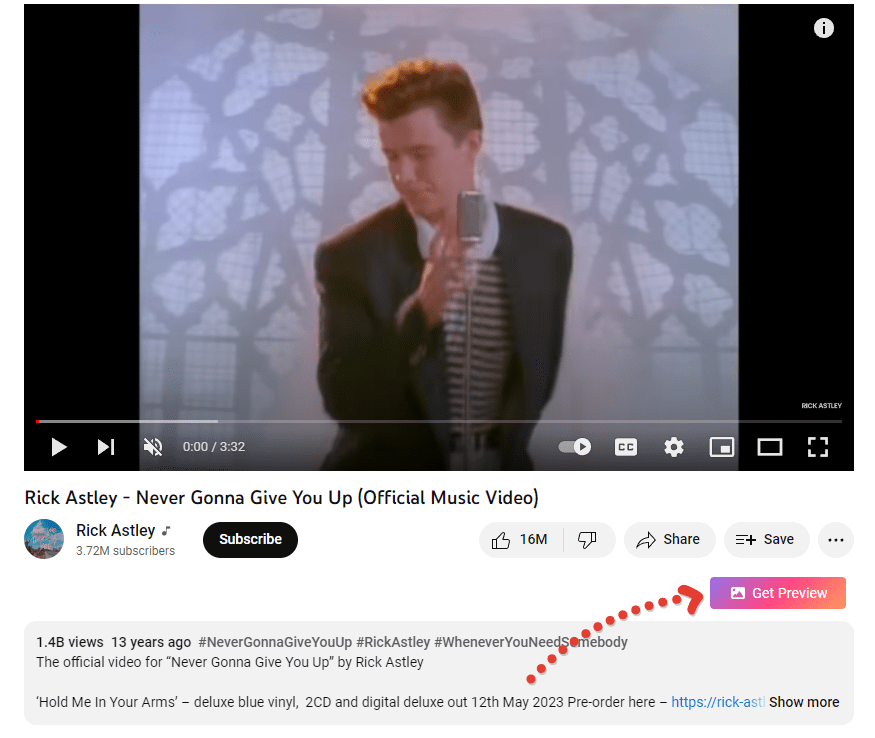
Click "Get Preview"
Navigate to any YouTube video and click the button. Your thumbnail is ready to download instantly!